

Most people still think of ChatGPT as a chatbot. Ask it something, it answers. Simple.
But that changed when OpenAI added real-time web browsing and launched ChatGPT Search. Now, when someone types “best project management tools for freelancers” or “top-rated dentists in Austin” into ChatGPT, it doesn’t just pull from its training data it crawls the live web, synthesizes results, and cites sources. Like a search engine, but more opinionated.
If your business or content isn’t showing up there, you’re missing a channel that’s growing fast. Over 300 million people use ChatGPT weekly as of early 2025. A meaningful slice of them are now using it as their primary way to search.
Here’s how to actually rank in ChatGPT search — not theoretically, but in practice.
Understand What ChatGPT Search Actually Does
Before optimizing for something, it helps to understand how it works.
ChatGPT Search uses Bing’s index as its backbone (OpenAI and Microsoft have a partnership). That means pages that rank well on Bing get surfaced more frequently in ChatGPT search results. It also runs its own crawl via a bot called OAI-SearchBot, which you can verify in your server logs.
The model then reads those pages and synthesizes an answer, often citing two to five sources. It favors pages that are clear, well-structured, and directly answer the question being asked — not pages that bury the answer under marketing language.
One important nuance: the base ChatGPT model (without browsing) still relies on training data with a knowledge cutoff. So for time-sensitive queries, ChatGPT Search is what’s active. For general knowledge questions, the model may answer without checking the web at all. This guide focuses on the search-enabled version.
Get Indexed by OAI-SearchBot
This is the starting point, and it’s easier to miss than you’d expect.
Check your robots.txt file. If it blocks Bingbot or GPTBot (OpenAI’s training crawler), it likely also affects OAI-SearchBot. Some website setups block all crawlers by default or were configured years ago without these newer bots in mind.
To explicitly allow ChatGPT’s search crawler, add this to your robots.txt:
User-agent: OAI-SearchBot
Allow: /
Also make sure your site loads quickly, has no major technical errors, and isn’t blocking JavaScript rendering — all the standard crawlability basics. A page that takes six seconds to load or returns intermittent 500 errors is going to get de-prioritized regardless of how good the content is.
Rank on Bing (Seriously)
Most SEO advice focuses entirely on Google. But since ChatGPT Search uses Bing’s index, Bing rankings matter here in a way they rarely have before.
The good news: Bing and Google use similar ranking signals. Strong content, quality backlinks, fast load times, and good structured data help on both. If you’re already ranking well on Google, you’re probably indexed on Bing too — but not necessarily ranking.
What Bing weights slightly differently: it tends to give more credit to social signals (shares, engagement on social platforms), exact-match domain names, and sites with clear authorship and about pages. It also crawls less frequently than Google, so new content may take longer to surface.
Submit your sitemap directly to Bing Webmaster Tools if you haven’t already. It’s free, takes ten minutes, and closes a gap that most businesses leave open.
Write Content That Answers Questions Directly
ChatGPT Search is trying to answer a question. It looks for pages that do the same.
That means your content structure matters as much as the content itself. If someone asks “how do I remove rust from cast iron” and your article spends the first 400 words on the history of cast iron cookware before getting to the answer, ChatGPT is going to pull from a page that gets there faster.
A few structural habits that help:
Put the core answer early. Within the first 100–150 words, give a clear, direct response to whatever question your page targets. You can expand on it after, but give the summary first.
Use descriptive H2 and H3 headings. ChatGPT reads heading structure to understand what a page covers. “Step 3” tells it nothing. “Step 3: Apply a thin layer of flaxseed oil” tells it exactly what that section answers.
Write in plain sentences. Not plain in a dumbed-down way — plain in the sense of direct. Active voice, no unnecessary jargon, no filler phrases like “it’s important to note that” or “in today’s world.”
Add a FAQ section at the bottom. This is one of the most reliable ways to appear in AI-generated answers. Write the exact questions your audience searches for, then answer each one in two to four sentences. These map directly to the conversational queries ChatGPT receives.
Build the Kind of Authority AI Tools Trust
ChatGPT doesn’t just pick any page that answers a question. It tends to pick pages from sources it has reason to trust.
That trust comes from a few places:
Backlinks and citations. Pages that other credible websites link to are treated as more authoritative. This hasn’t changed from traditional SEO it’s just now relevant in a new context.
Brand mentions across the web. If your business name appears consistently in industry articles, review platforms, news coverage, and forums, AI models develop a stronger “sense” of who you are. This is especially true for the base model (non-search ChatGPT), which learned about the world through text scraped from the web. The more you appeared in credible contexts before the training cutoff, the more likely the model has accurate information about you.
Author credibility signals. Pages with visible authorship a named author with credentials, an author bio page, links to their other work tend to perform better in AI results. This is part of what Google calls E-E-A-T (Experience, Expertise, Authoritativeness, Trustworthiness), and it transfers to how ChatGPT evaluates sources too.
Consistent, up-to-date content. A page last updated in 2019 is a weaker citation than one updated last month, especially for anything time-sensitive. Add “last updated” dates to your posts. Refresh old content with new information. ChatGPT Search favors recency on queries where it matters.
Use Schema Markup
Schema markup is structured data embedded in your page’s code that tells crawlers including OAI-SearchBot exactly what your content is about.
For ChatGPT Search specifically, the most useful schema types are:
- FAQPage marks up question-and-answer sections for easy extraction
- Article establishes authorship, publish date, and content type
- LocalBusiness critical for businesses with a physical location or service area
- HowTo structures step-by-step guides in a machine-readable format
- Product essential for e-commerce, includes pricing, availability, and reviews
If you’re on WordPress with RankMath, most of this is built into the plugin’s Schema tab. Turn it on, fill in the fields, and you’re most of the way there without touching any code.
Don’t Ignore Your Offsite Presence
Your website is only one place AI tools look.
ChatGPT, when asked about a local business or brand, will pull from Google Business Profile data (via Bing Places), review sites like Yelp and Trustpilot, industry directories, Reddit threads, and news articles. If you only optimize your website and ignore everything else, you’re leaving a lot of surface area uncovered.
The practical checklist:
- Claim and fully complete your Bing Places listing (the Bing equivalent of Google Business Profile)
- Keep your information consistent across all directories — same business name, address, phone number, and website URL everywhere
- Respond to reviews on major platforms; AI tools interpret active engagement as a trust signal
- Get listed in industry-specific directories relevant to your category
FAQ: Ranking in ChatGPT Search
Does ChatGPT Search use Google’s index? No. It uses Bing’s index as its primary source, via OpenAI’s partnership with Microsoft. Ranking well on Bing gives you more visibility in ChatGPT Search than ranking on Google alone.
How do I know if OAI-SearchBot has crawled my site? Check your server access logs for requests from OAI-SearchBot. You can also use Bing Webmaster Tools to verify indexing and crawl activity.
Can I pay to appear in ChatGPT Search results? Not directly. ChatGPT Search doesn’t sell sponsored placements within its organic results. The way to appear is through content quality, indexability, and authority — the same fundamentals as organic search.
How long does it take to rank in ChatGPT Search? There’s no fixed timeline. Technical fixes (robots.txt, sitemap submission) can take effect within days. Content authority builds over months. Expect meaningful results in three to six months for a new site; faster if your site already has established authority.
Does social media activity affect ChatGPT Search rankings? Indirectly. Bing weights social signals more than Google does, so content that earns shares and engagement tends to rank better in Bing and by extension, surfaces more in ChatGPT Search.
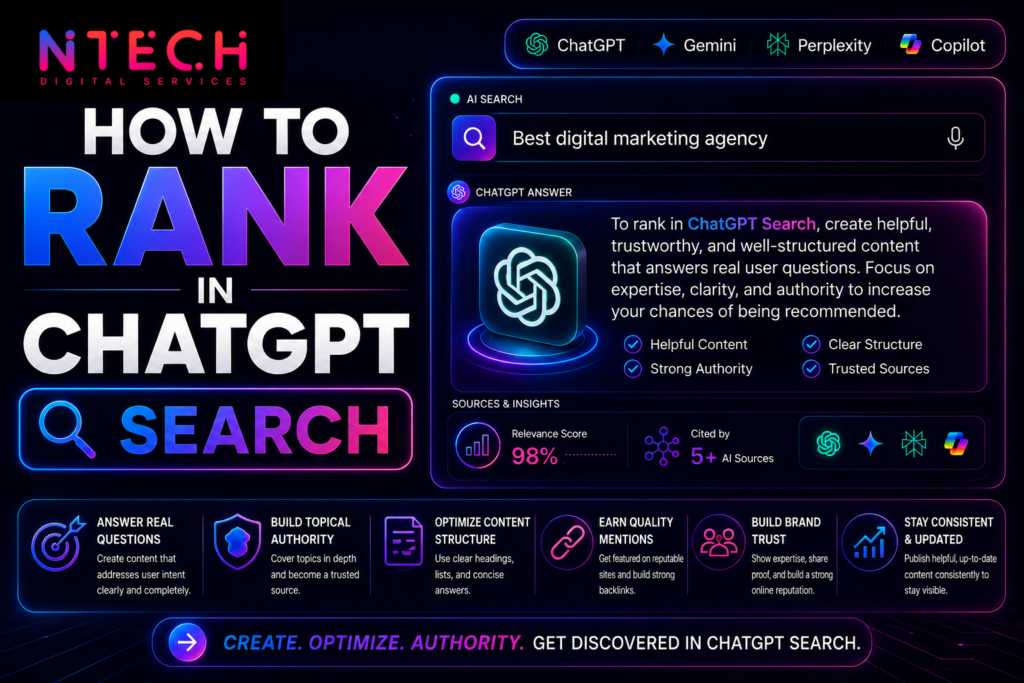
Steps to rank in ChatGPT search
The Honest Bottom Line
ChatGPT Search isn’t a separate game with completely different rules. It’s an extension of the same credibility contest that search has always been but with higher stakes on content clarity, source authority, and structured data.
The businesses showing up in ChatGPT results today are mostly the ones that have been doing the fundamentals well for a while. That’s either reassuring or annoying depending on where you’re starting from. Either way, the path forward is clear: fix your technical foundation, write content that actually answers things, build credibility across the web, and be patient.
The channel is still early. Getting your basics right now puts you ahead of most competitors who haven’t thought about this yet.